Uncategorized

Collect a performance trace in new Outlook for Windows

Hello,

If you’re using the New Outlook for Windows and have been experiencing issues, you can now easily capture a performance trace, a network trace or both from the system tray.

The first public troubleshooting article on Learn is now available, and describes how to capture a performance trace via the system tray to help you collecting logs when you are working with Microsoft Support team.

🔧 Check it out here: https://learn.microsoft.com/en-us/troubleshoot/outlook/performance/collect-performance-trace

And if you are looking for more troubleshooting documentation, bookmark this page: https://learn.microsoft.com/en-us/troubleshoot/microsoft-365-apps/

Enjoy it,

Sara Barbosa

Comunidade, Office365

So I joined Microsoft, then 5 years zipped by…

I always wanted to do this blogpost but I was not quite sure what to write in here, I hope isn’t too late. When I first started at Microsoft in June 2020 (yes, took me 5 years to write this post), that’s because I spent a lot of time convincing myself that my career dream had come true. Back when I was in Brazil, I had big dream to be part of the Microsoft team and I had a few chances before, but I guess wasn’t ready. So, when I got the new chance to join the team, especially the M365 ACE Engineering team, I was honestly a bit shocked it was happening – my career in IT started in 2007 – 18 years ago, and took me 13 years of preparation to officially join Microsoft Corp. It was like a crazy tv show with 13 episodes passing in front of me leading to a happy ending. There has been a lot to process all of that!

I did the below collage back in June 16 2020, a day after starting in Microsoft and the day I left MVP family after 9 cycles,I don’t know why, but I never posted this collage anywhere.

So, how did I end up at Microsoft? Let me simplify: hard work + the Microsoft Tech Community.

After 13 years of working with Microsoft technologies for the tech community, MSTF partners, and customers, I found myself in Berlin, ready to join a smaller local company to continue work as M365 Administrator. But thanks to the MVP community and some incredile networking, a friend in Berlin connected me with another friend in Redmond (Thanks to Jo & Carlos), and just like that, everything changed – a M365 ACE role in Dublin was open! Right timing, that time was ready, and of course with the support of my husband and friends, I got in!

After all those years working with Microsoft tech, BPOS, Office 365, and M365, I’m here living my dream. Yesterday, June 15, I hit my 5-year anniversary! I’m about to get my first crystal to celebrate these good 5 years with a fantastic manager, and team full of great and knowledgeable people. I feel super lucky, and it’s amazing to see all that hard work paying off too.

I know there’s still so much more to learn, grow, and share, but I couldn’t be more thankful for all the achievements, challenges, promotions, and opportunities I’ve had so far in this company.

This is a post to celebrate that I got in and to celebrate 5 years since a dream came true and it’s a reminder for myself and everyone else that with hard work, persistence and a clear direction, we can find our way to the wished path.

Big thanks to everyone who’s been there for me on this journey!

Sara Barbosa

PT-BR only – In case you want to explore a few more details about my journey, I wrote a few notes about my career journey 2007-2020, and it was attached to the collection of community stories in this book: O Poder do PeopleChain or at this link Sobre Sara Barbosa – PT-BR.pdf

Azure AI, Copilot, Copilot Agents, Governance, Microsoft, Microsoft 365 Copilot

Agent Governance Whitepaper Available

Hello,

I love governance topics, so happy to share that a agent governance whitepaper has now been published and its available. The Agent Governance Whitepaper provides a comprehensive overview of strategies and tools necessary for securing and governing agents within Microsoft 365 environments. It equips IT admins with the knowledge required to effectively manage and safeguard organizational data while enabling agents to their business users.

Key Highlights

  1. Types of Agents:
    • SharePoint Agents: Built using content stored in SharePoint sites and libraries.
    • Copilot Studio Agent Builder: Create conversational templates tailored to specific tasks.
    • Copilot Studio: Use triggers, advanced logic, and connections to create complex agents.
    • Pro Developer Tools: Utilize tools like Teams Toolkit and Azure AI Foundry for customized agents.
  2. Governance Capabilities:
    • Security Controls: Protect organizational data and ensure agents operate within secure parameters.
    • Consistency: Maintain uniform standards across all deployed agents.
    • Responsible Use: Implement guidelines for ethical and responsible agent usage.
  3. Management Tools:
    • Microsoft 365 Admin Center: Monitor, configure, and manage agents, ensuring performance, security, and compliance.
    • Power Platform Admin Center: Define and enforce policies for agent behavior and data protection.
    • Microsoft Purview: Classify, label, and manage data sensitivity to protect sensitive information.

Download and review the latest version of the Agent Governance to leverage intelligent agents for transforming operations and driving business value.

For more details, visit the Microsoft Tech Community.

Enjoy!
Sara Barbosa

Microsoft Teams

Session: How to troubleshoot various Microsoft Teams Issues using Automated Diagnostics at #TeamsNation

Hello attendees of the #TeamsNation 2022 conference, here is the link of the slide deck of my session:

How to troubleshoot various Microsoft Teams Issues using Automated Diagnostics – Sara Barbosa.pptx

Learn more about covered scenarios and how to run the diagnostics below:

Self-help diagnostics for Microsoft Teams administrators

Self-help diagnostics for issues in Exchange Online and Outlook

Self-help diagnostics for SharePoint Online and OneDrive

Microsoft Remote Connectivity Analyzer*

Enjoy!

Sara Barbosa

Comunidade, MVP, Office 365

I’ll be speaking at #TeamsNation 2022

Hello,

I haven’t posted anything since 2020… sorry for that, but you probably know… so many things have happened: Covid19, new job, new country… but I recognize that not being here on my own blog is all my fault, but this explanation can wait a bit longer.

I wanted to let you know that tomorrow I will be speaking at the #TeamsNation conference and I wanted you to attend this amazing conference, more info here:

https://teamsnation2022.sessionize.com/

My session is scheduled to start at 12pm UTC, and I’ll be showing you how to troubleshoot various MS teams issues using the automated diagnostics available in the M365 Admin Center.

https://teamsnation2022.sessionize.com/speaker/dd2cf168-1dac-42cf-827c-351865bac056

session-TeamsNation-SaraBarbosa

See you there,

Sara Barbosa

Digital Workplace, Microsoft, Power Platform, PowerBI

Meetup | Berlin Power BI User Group – Talking about Power BI Governance

This post is a promoting of a message posted on https://www.meetup.com/Berlin-Power-BI-User-Group/events/270463360/

Hi Power BI enthusiasts,

we’re keeping up our pace, and will deliver another event in May. Microsoft MVP Sara Barbosa will speak about Power BI Governance, a topic, which we didn’t cover in our previous events, yet is very important.
The good thing about Power BI, that it is easy to set up and use, can turn into a negative one, when there is no proper administration in place.
Sara Barbosa will give an overview of the Power BI Admin Center, as well as share some best practices she established over time being a Microsoft 365 Administrator.
It will be an online event again, scheduled for Tuesday, May 26 at 7:00 PM CEST. Link to the event will be provided in time before it starts.

Hope to see you there and until then, stay healthy and keep CALCULATEing on!

Chris, Artur & Sara

Details you can always find on the event page: https://www.meetup.com/Berlin-Power-BI-User-Group/events/270463360/ and the directly link to join this meetup is https://us02web.zoom.us/j/86792637763

I hope to see you in a bit.

Sara

Microsoft, MSP, MTAC, MVP

Eventos | Agenda 20 a 23 de Abril 2020

Olá pessoal,

Espero que todos estejam bem e salvos em casa! E para quem não pode ficar em casa e estava lutando/trabalhando em áreas essenciais – Muito obrigada!

Essa pandemia vai trazer muitas consequências, e os problemas nem mesmo realmente começaram e alguns estudiosos dizem que a única salvação que já pode ser prevista é para quem tem conhecimento ou quem esta pronto para o “novo normal”, pensando nisso eu gostaria de divulgar alguns eventos para essa semana e espero que isso possa ser uma pequena ajuda aos que estão “perdidos” procurando saber o que fazer com tanto tempo livre> estude, aprenda coisa coisas nova, capacitação talvez seja o melhor remédio para nós nesse momento.

Bom, chega de papo e segue abaixo os eventos na qual vou palestrar e também vou participar para aprender com colegas.

MVPWeek Latam 2020 | Semana 1 – 20 a 23.04

https://mvpweek.github.io/

image

image

VladTalksTech | Webinar Dia 21.04

https://zoom.us/webinar/register/2515852735983/WN__RIlEq4KSgWJ2PykMDu8YA

vladtalk

Tema:

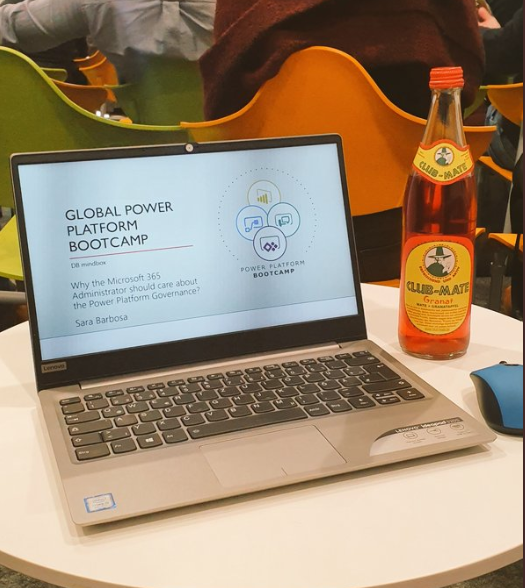
Why the Microsoft 365 Administrator should care about the Power Platform Governance?

Descrição:

Join your host Microsoft MVP Vlad Catrinescu as well as special guest & Microsoft MVP Sara Barbosa on this free webinar to talk about the Power Platform.
Microsoft 365 Administrator is no longer only responsible for administering Exchange Online or SharePoint Online. Every day the Microsoft 365 platform evolved and new features are released generates more demands for administrators one of them is the Governance of Microsoft Flow, Power apps, and Power BI.
In this webinar you’ll be learning tips and tricks on how to create Power Platform DLP policies and alerts, control Security roles, use Audit logs and usage reports while maintaining compliance and a secure environment for MS Flow, Power Apps and Power BI.

Espero te ver online lá!

Abraços,

Sara Barbosa

Microsoft Teams

Criar uma conta free do Microsoft Teams utilizando o e-mail do gmail

Olá Pessoal,

Gravei alguns passos de como criar uma conta no Microsoft Teams utilzando apenas meu e-mail do gmail, ao final do processo eu terei uma versão gratuita do Teams para utilizar – reveja as Versões do Microsoft Teams , mas mesmo assim já ajuda muito. Espero que seja útil.

Vídeo sem audio – apenas com passo a passo que fiz:

Enjoy it,

Sara Barbosa

Office 365, Power Platform

Global Power Platform Bootcamp 2020 – Berlin

Hi there,

Few weeks ago I was presenting a session at Global Power Platform Bootcamp in Berlin.

imageimage

That session topic I created based on many lessons learned recently. During my session I was talking about the importance adding Power Platform as part of the admin tasks, as is not anymore only EXO, SPO, O4B, Teams etc which a M365 Admin needs pay attention. I also know that it is a total new world for us, but we cannot avoid take many actions to prevent, govern and deliver solutions to our business users which are seeking to use the power of the tools.

I am writing this post not to give you details about the session, but to share the slides deck and invite you to join me at SPS Warsaw Online on April 3rd  where I’ll be speaking about the same topic.

GPPB 2020 Slide desk are here:

image

Register to SPS Warsaw Online, using this link:

image

See you there.

Sara Barbosa

MVP, Office365, PowerBI

SPS Bremen 2020

Hi There,

Some weeks ago I was delivering a session at SPS Bremen. My talk was about taking advantages of Power BI to build MS 365 Usage Reports, I had a nice and funny day together with Microsoft community.

spsbre3

spsbre2

spsbr4SPSBre1

and as I promised during my session below you can find the link to my slide deck.

Slides Deck:

PPTx

Enjoy it and I hope see you soon.

Sara Barbosa

Governance, MVP, PowerBI, PPWT2019

Power Platform World Tour – Munich

Hi there,

I have been posting here only about events where I was a speaking, right?

Smile with tongue out Yeah, I know that here is missing many many other contents. One positive thing of it that is I am generating few nice slides deck which you can use as much as you can, negative point is there is no more new technical article. So sorry for that… Maybe next year things can be changed.

Nevertheless, the goal for this post is share about one more event I did in Munich on November 5th. Jena Coffie PP Community leader invited me to deliver two sessions at Power Platform World Tour, the event is happening around the world and it is covering all the solutions under the Microsoft Power Platform such as MS Automate, Power Apps, Dynamics 365 and Power BI.

SaraSession

There I had two session, the first one was about Power BI Governance & Best Practices and as you can see above I had such a nice audience, all the slide content you can find here (also I learned that is necessary to reduce the content if I only have 1 hour Smile with tongue out):

image

Second session I was delivering the same as I did last year during the Ignite The Tour in Berlin, of course I did few changes but the main proposal stayed. You can also find the slides below, there is not a lot of content but I added few Flows screenshot in case you want to replicate it yourself.

image

If you were there, please send me a message saying ‘Hi’, if you were not I hope you enjoy the content above and maybe next time we can meet in somewhere.

Enjoy.
Sara Barbosa

Microsoft Teams, MVP

aOS Aachen – 2019

Hi everyone!

I participated as a speaker at aOS conference in Aachen this year and it was an interesting experience. I’ve also meet friends from the nice community and joined German sessions to train the ears a little.

Speakers Aachen 2019 1Speakers Aachen 2019 2

During my session I did (tried) make my intro in German for the first time,  perhaps I need to improve a lot not only German but English skills hahahhahah. My session was based on MS Teams Use Cases and how is the new way to work as a Team with MS Teams, I had basically demos prepared and added some cases to help on new Team Structure creation which I showed in the end of the session.

As few nice attends after the session asked for the slides, here they are:

image

I would like to say a big thank you to Patrick and Sascha which accepted my session, also to all speakers, sponsors and attends that made this great day  happened!

So that’s it! A short post just to share the slides while I am here in Duisburg waiting for my train back to Berlin (btw the train is delayed 35 minutes).

Abracos,

Sara Barbosa

Microsoft Flow

Salvar anexos e encaminhar e-mails recebidos usando Microsoft Flow

Salvar anexos e encaminhar e-mails recebidos usando Microsoft Flow

Oi Pessoal,

Tenho uma dica simples para compartilhar.

Tive uma demanda essa semana de pegar todos os e-mails de aprovação de férias que chegam em minha caixa postal e encaminhar para o RH, eu fazia isso manualmente porque usamos uma ferramenta terceira para administrar o fluxo de aprovação entre minha requisição e a aprovação do meu gerente e não há integração com o time do RH – não me pergunte o porquê hehehhe.

Usando o Microsoft Flow temos conectores para Outlook, Gmail e Office 365 Outlook e sendo assim consigo manipular itens que chegam na minha caixa postal, não é só encaminhar o e-mail que é possível, você pode salvar os anexos no seu onedrive ou SharePoint, pode criar itens em bibliotecas do SharePoint, postar mensagens no Microsoft Teams etc. O meu cenário é simples e eu poderia ter feito com regras do outlook, mas como também gosto de salvar as confirmações no meu OneDrive optei por fazer via MS Flow.

Cenário:

Sempre que um e-mail chegar com o assunto: “Solicitação de férias aprovadas por Daniel” > Salvar o anexo do e-mail no meu OneDrive for Business > encaminhar e-mail para RH e adicionar uma mensagem padrão.

Como fiz:

Connector: Office 365 Outlook

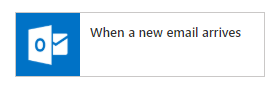
Vou monitorar minha caixa postal usando o conector do Office 365 Outlook:

image

when an new email arrives

Você consegue fazer o mesmo com outlook.com e gmail.com.

Configurações de regras do connector:

Adicionando regras quando o e-mail chegar, por exemplo qual pasta devo monitorar, se existe anexos, para quem foi enviado, classificação de importancia e o assunto do e-mail são as opções atuais para configurar as regras.

No meu caso eu quero monitorar o título, pois a ferramenta que usamos para aprovar férias sempre manda o e-mail de confirmação com o mesmo título e arquivo em pdf com as informações da solicitação:
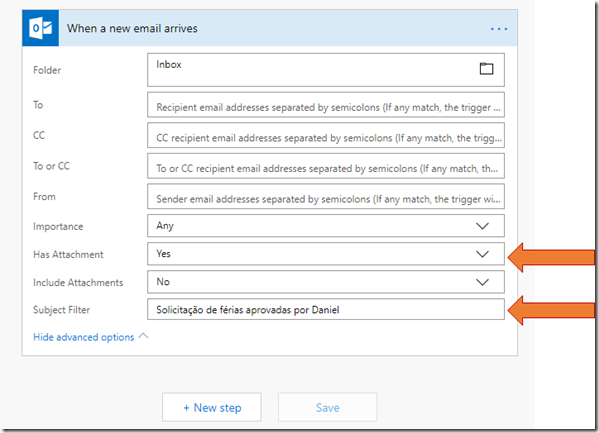
when an new email arrives - settings

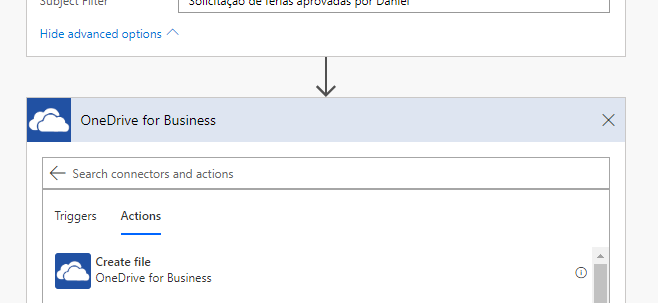
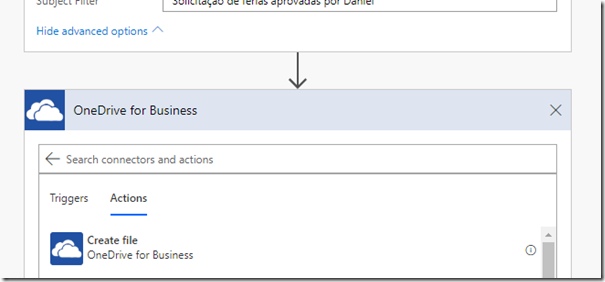
Ação 1: Salvar a confirmação (arquivo pdf) no OneDrive for Business:

Conector: OneDrive for Business
image

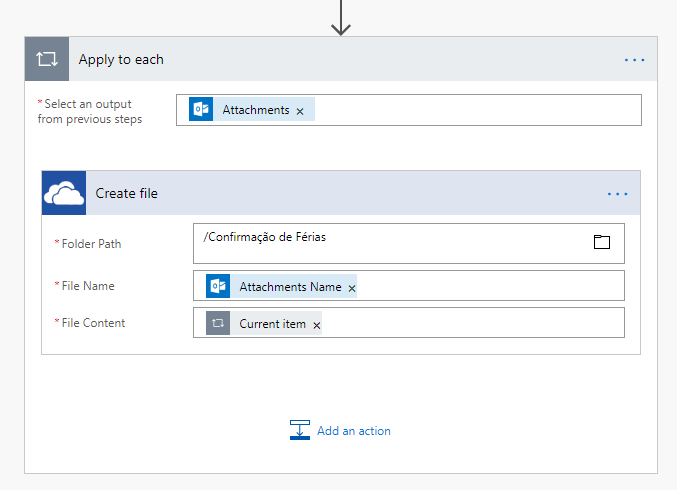
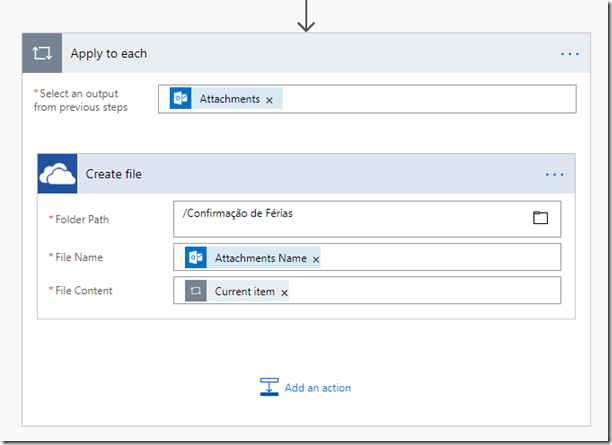
Selecionei a pasta do OneDrive, apliquei a ação para o anexo do e-mail e o arquivo receberá o nome do anexo e o conteudo será o próprio anexo, bem simples o próprio Flow vai te guiar nas configurações. No final ficará dessa forma:
image

Ação 2: Encaminhar o e-mail original para RH:

Connector: Office 365 Outlook

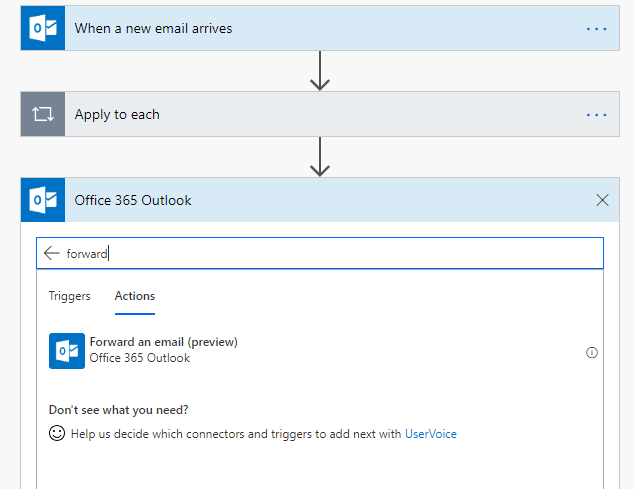
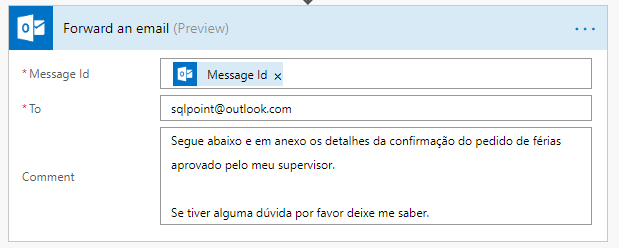
Selecionando o conector do outlook novamente, eu pesquisei por “Forward”, essa ação ainda está em preview, mas funciona bem.

Adicionei para quem vou encaminhar o e-mail e adicionei um comentário:

image

image

Resultado:

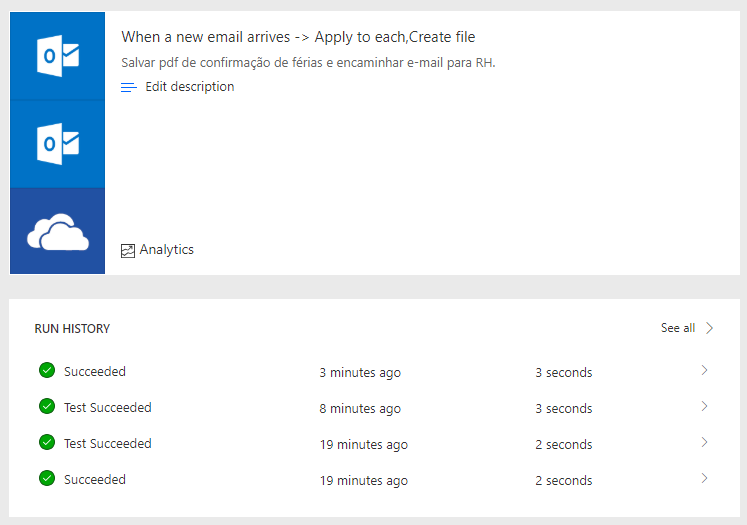
O Diagrama do Flow fica simples e fácil de administrar, são apenas 3 etapas:

image

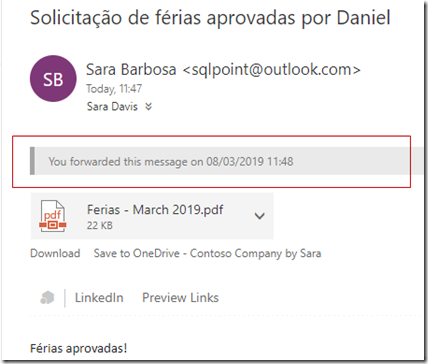
Na caixa postal é possível notar se o workflow está funcionando:
image

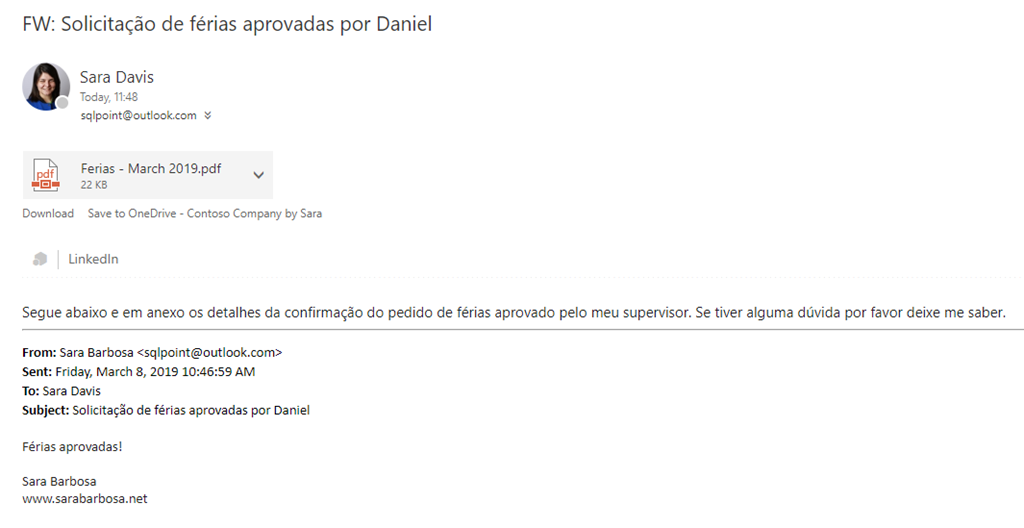
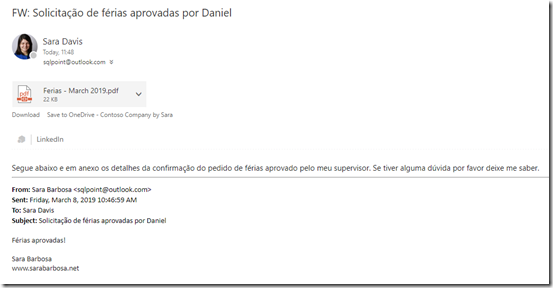
Consultar a mensagem customizada e o resultado do encaminhamento na caixa de saída:
image

E monitorar a saúde do fluxo utilizando os logs do próprio MS Flow:

image

Bom, era isso, simples assim!

Espero que vocês gostem e explorem mais do potencial do MS Flow, esse site tem muitos treinamentos para ajudar a colocar em prática as ideias: https://docs.microsoft.com/en-us/flow/

Abraços,

Sara Barbosa